Dify中的预定义模型插件开发例子:以siliconflow为例
本文使用Dify v1.0.0-beta.1版本。模型插件结构基本是模型供应商(模型公司,比如siliconflow、xinference)- 模型分类(模型类型,比如llm、rerank、speech2text、text_embedding、tts)- 具体模型(比如,deepseek-v2.5)。本文以siliconflow为例,介绍Dify中的预定义模型插件开发例子。
一.siliconflow模型插件
SiliconCloud (MaaS) 简化AI模型的部署,同时提供强大的性能支持。通过该插件,用户可访问多种模型(如大语言模型、文本嵌入、重排序、语音转文本、文本转语音等),并可通过模型名称、API密钥及其它参数进行配置。
1.多层模型分类
├─llm │ deepdeek-coder-v2-instruct.yaml │ deepseek-v2-chat.yaml │ deepseek-v2.5.yaml │ gemma-2-27b-it.yaml │ gemma-2-9b-it.yaml │ glm4-9b-chat.yaml │ hunyuan-a52b-instruct.yaml │ internlm2_5-20b-chat.yaml │ internlm2_5-7b-chat.yaml │ Internvl2-26b.yaml │ Internvl2-8b.yaml │ internvl2-llama3-76b.yaml │ meta-mlama-3-70b-instruct.yaml │ meta-mlama-3-8b-instruct.yaml │ meta-mlama-3.1-405b-instruct.yaml │ meta-mlama-3.1-70b-instruct.yaml │ meta-mlama-3.1-8b-instruct.yaml │ mistral-7b-instruct-v0.2.yaml │ mistral-8x7b-instruct-v0.1.yaml │ qwen2-1.5b-instruct.yaml │ qwen2-57b-a14b-instruct.yaml │ qwen2-72b-instruct.yaml │ qwen2-7b-instruct.yaml │ qwen2-vl-72b-instruct.yaml │ qwen2-vl-7b-Instruct.yaml │ qwen2.5-14b-instruct.yaml │ qwen2.5-32b-instruct.yaml │ qwen2.5-72b-instruct.yaml │ qwen2.5-7b-instruct.yaml │ qwen2.5-coder-32b-instruct.yaml │ qwen2.5-coder-7b-instruct.yaml │ qwen2.5-math-72b-instruct.yaml │ yi-1.5-34b-chat.yaml │ yi-1.5-6b-chat.yaml │ yi-1.5-9b-chat.yaml │ ├─rerank │ bce-reranker-base_v1.yaml │ bge-reranker-v2-m3.yaml │ ├─speech2text │ funaudio-sense-voice-small.yaml │ sense-voice-small.yaml │ ├─text_embedding │ bce-embedding-base-v1.yaml │ bge-large-en-v1.5.yaml │ bge-large-zh-v1.5.yaml │ bge-m3.yaml │ └─tts fish-speech-1.4.yaml
2.通过API秘钥配置
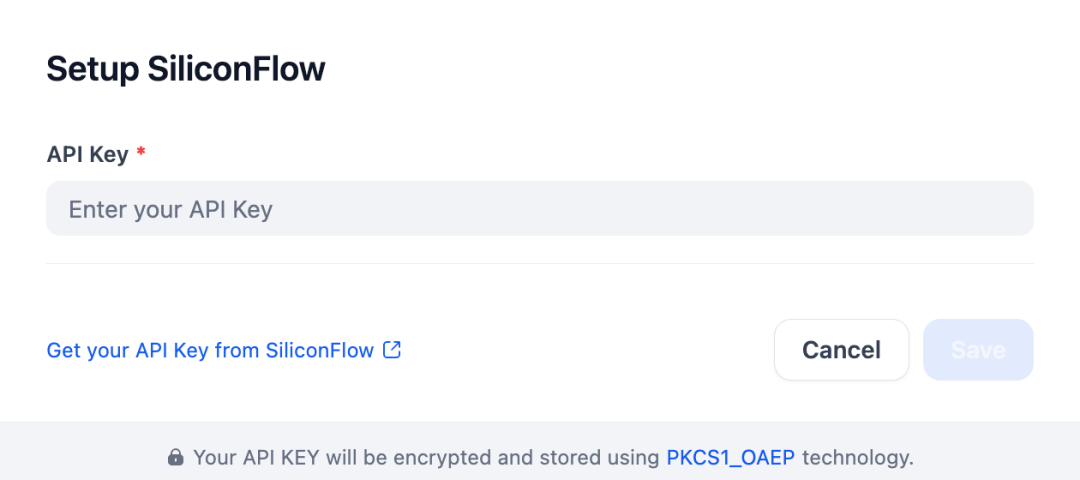
安装 SiliconFlow插件后,通过输入 API密钥进行配置。如下所示:
二.创建模型供应商
通过Dify插件脚手架工具,创建项目就不再介绍了,主要是选择模型插件模版和配置插件权限等操作[1][2]。
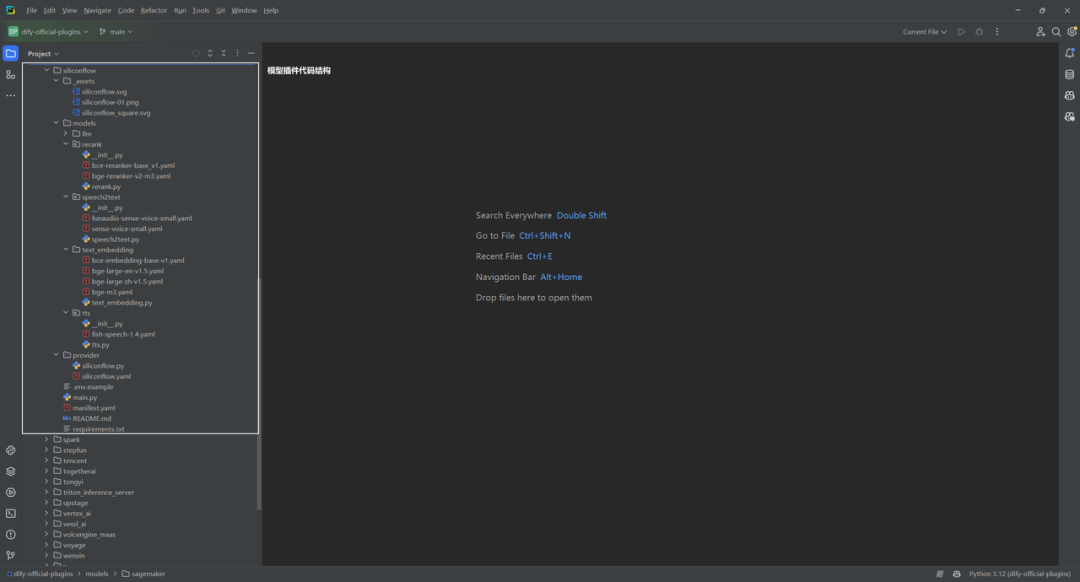
1.创建模型供应商配置文件
Manifest是 YAML格式文件,声明了模型供应商基础信息、所支持的模型类型、配置方式、凭据规则。插件项目模板将在 /providers 路径下自动生成配置文件。
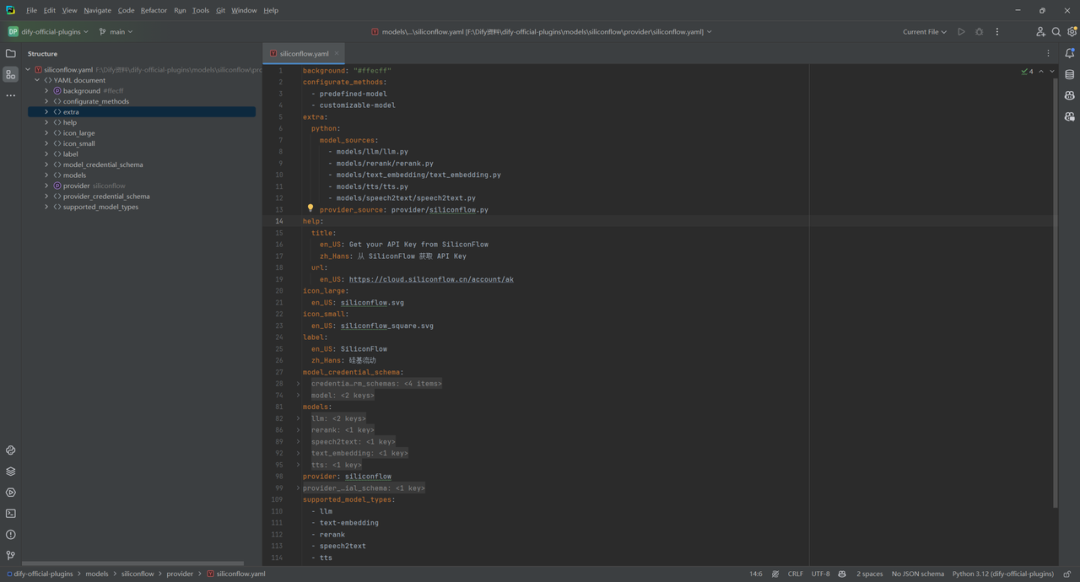
background: "#ffecff" configurate_methods: - predefined-model - customizable-model extra: python: model_sources: - models/llm/llm.py - models/rerank/rerank.py - models/text_embedding/text_embedding.py - models/tts/tts.py - models/speech2text/speech2text.py provider_source: provider/siliconflow.py help: title: en_US: Get your API Key from SiliconFlow zh_Hans: 从 SiliconFlow 获取 API Key url: en_US: https://cloud.siliconflow.cn/account/ak icon_large: en_US: siliconflow.svg icon_small: en_US: siliconflow_square.svg label: en_US: SiliconFlow zh_Hans: 硅基流动 model_credential_schema: credential_form_schemas: - label: en_US: API Key placeholder: en_US: Enter your API Key zh_Hans: 在此输入您的 API Key required: true type: secret-input variable: api_key - default: "4096" label: en_US: Model context size zh_Hans: 模型上下文长度 placeholder: en_US: Enter your Model context size zh_Hans: 在此输入您的模型上下文长度 required: true type: text-input variable: context_size - default: "4096" label: en_US: Upper bound for max tokens zh_Hans: 最大 token 上限 show_on: - value: llm variable: __model_type type: text-input variable: max_tokens - default: no_call label: en_US: Function calling options: - label: en_US: Not Support zh_Hans: 不支持 value: no_call - label: en_US: Support zh_Hans: 支持 value: function_call required: false show_on: - value: llm variable: __model_type type: select variable: function_calling_type model: label: en_US: Model Name zh_Hans: 模型名称 placeholder: en_US: Enter your model name zh_Hans: 输入模型名称 models: llm: position: models/llm/_position.yaml predefined: - models/llm/*.yaml rerank: predefined: - models/rerank/*.yaml speech2text: predefined: - models/speech2text/*.yaml text_embedding: predefined: - models/text_embedding/*.yaml tts: predefined: - models/tts/*.yaml provider: siliconflow provider_credential_schema: credential_form_schemas: - label: en_US: API Key placeholder: en_US: Enter your API Key zh_Hans: 在此输入您的 API Key required: true type: secret-input variable: api_key supported_model_types: - llm - text-embedding - rerank - speech2text - tts
如果接入的供应商提供自定义模型,比如siliconflow提供微调模型,需要添加model_credential_schema 字段。
2.编写模型供应商代码
供应商需要继承 __base.model_provider.ModelProvider 基类,实现 validate_provider_credentials 供应商统一凭据校验方法即可。如下所示:
`` import logging
from dify_plugin import ModelProvider
from dify_plugin.entities.model import ModelType
from dify_plugin.errors.model import CredentialsValidateFailedError
logger = logging.getLogger(name)
class SiliconflowProvider(ModelProvider):
def validate_provider_credentials(self, credentials: dict) -> None:
"""
Validate provider credentials
if validate failed, raise exception
:param credentials: provider credentials, credentials form defined in provider_credential_schema.
"""
try:
model_instance = self.get_model_instance(ModelType.LLM)
model_instance.validate_credentials(model="deepseek-ai/DeepSeek-V2.5", credentials=credentials)
except CredentialsValidateFailedError as ex:
raise ex
except Exception as ex:
logger.exception(f"{self.get_provider_schema().provider} credentials validate failed")
raise ex
``
三.接入预定义模型
1.按模型类型创建不同模块结构
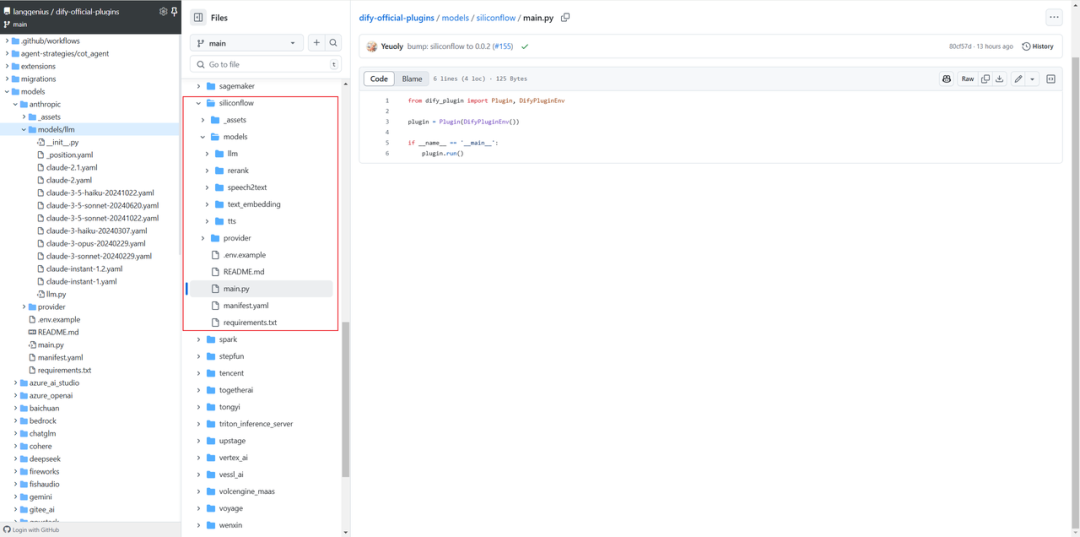
模型供应商下可能提供了不同的模型类型,需在供应商模块下创建相应的子模块,确保每种模型类型有独立的逻辑分层,便于维护和扩展[3]。当前支持模型类型如下:
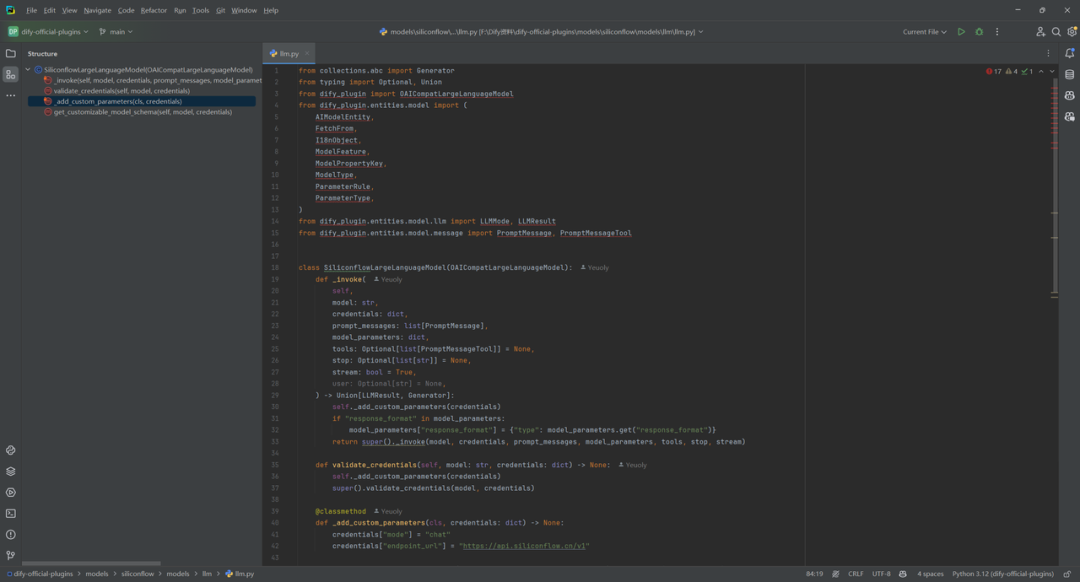
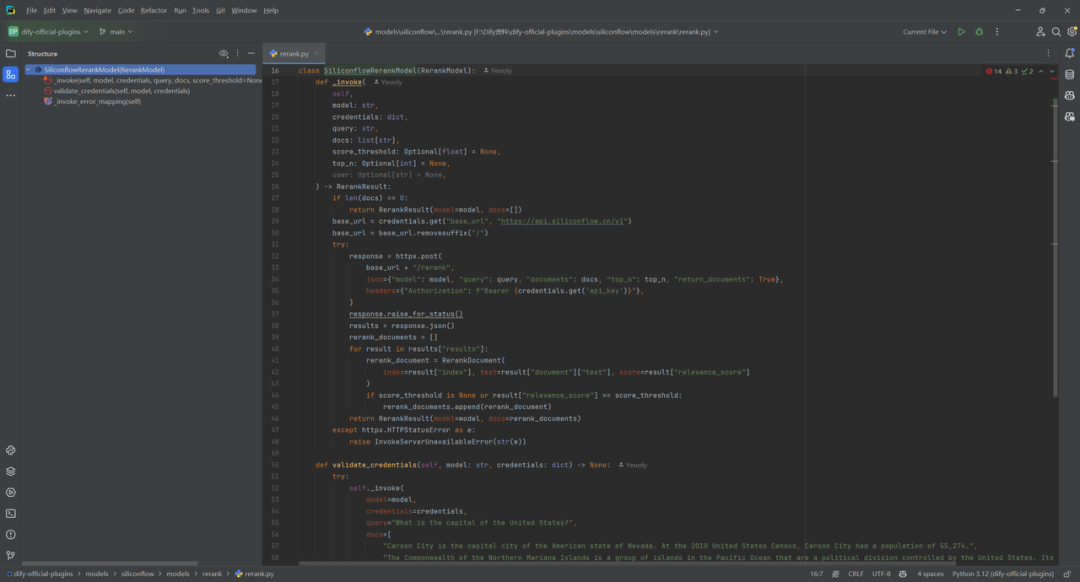
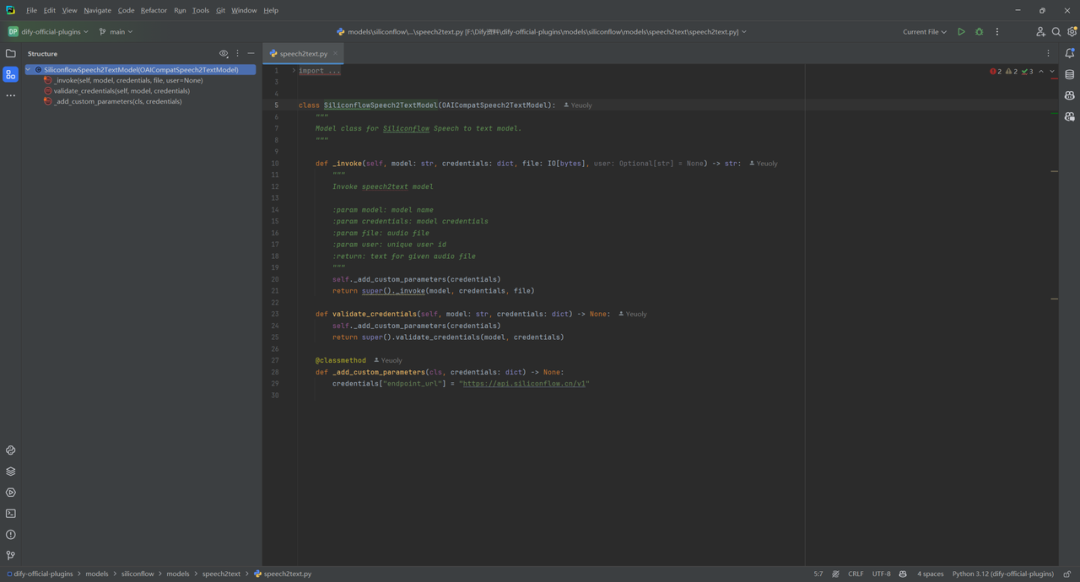
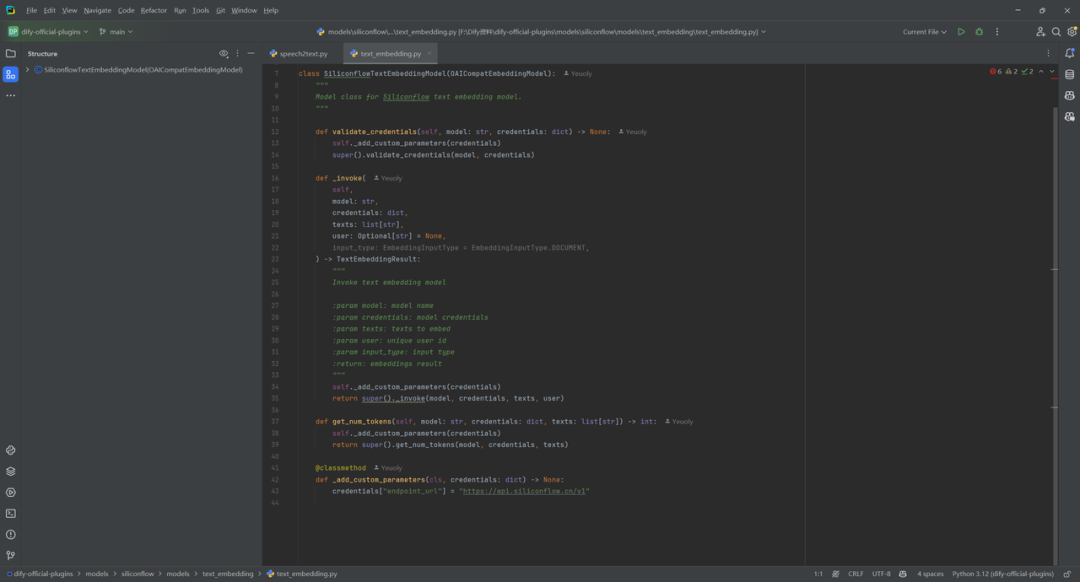
2.编写模型调用代码
(1)llm.py
(2)rerank.py
(3)speech2text.py
(4)text_embedding.py
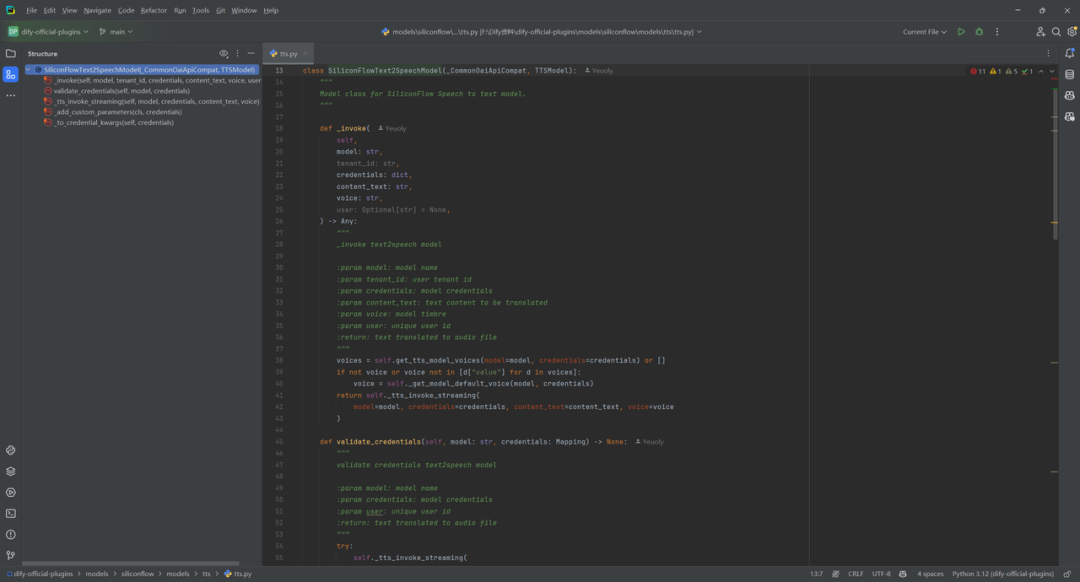
(5)tts.py
3.添加预定义模型配置
如果供应商提供了预定义模型,为每个模型创建与模型名称同名的 YAML文件(例如 deepseek-v2.5.yaml)。按照 AIModelEntity [6]的规范编写文件内容,描述模型的参数和功能。
model: deepseek-ai/DeepSeek-V2.5 label: en_US: deepseek-ai/DeepSeek-V2.5 model_type: llm features: - agent-thought - tool-call - stream-tool-call model_properties: mode: chat context_size: 32768 parameter_rules: - name: temperature use_template: temperature - name: max_tokens use_template: max_tokens type: int default: 512 min: 1 max: 4096 help: zh_Hans: 指定生成结果长度的上限。如果生成结果截断,可以调大该参数。 en_US: Specifies the upper limit on the length of generated results. If the generated results are truncated, you can increase this parameter. - name: top_p use_template: top_p - name: top_k label: zh_Hans: 取样数量 en_US: Top k type: int help: zh_Hans: 仅从每个后续标记的前 K 个选项中采样。 en_US: Only sample from the top K options for each subsequent token. required: false - name: frequency_penalty use_template: frequency_penalty - name: response_format label: zh_Hans: 回复格式 en_US: Response Format type: string help: zh_Hans: 指定模型必须输出的格式 en_US: specifying the format that the model must output required: false options: - text - json_object pricing: input: '1.33' output: '1.33' unit: '0.000001' currency: RMB
4.调试和发布插件
调试和发布插件不再介绍,具体操作参考文献[2]。
参考文献
[1] Model 插件:https://docs.dify.ai/zh-hans/plugins/quick-start/developing-plugins/model
[2] Dify中的GoogleSearch工具插件开发例子:https://z0yrmerhgi8.feishu.cn/wiki/Ib15wh1rSi8mWckvWROckoT2n6g
[3] https://github.com/langgenius/dify-official-plugins/tree/main/models/siliconflow
[4] 模型设计规则:https://docs.dify.ai/zh-hans/plugins/api-documentation/model/model-designing-specification
[5] 模型接口:https://docs.dify.ai/zh-hans/plugins/api-documentation/model/mo-xing-jie-kou
[6] AIModelEntity:https://docs.dify.ai/zh-hans/plugins/api-documentation/model/model-designing-specification#aimodelentity
[7] Dify中的预定义模型插件开发例子:以siliconflow为例(原文链接):https://z0yrmerhgi8.feishu.cn/wiki/BwPYw0VajidKURkxxBIc0UH7n5f
(文:NLP工程化)
相关文章