commands.py中的函数解析1:reset_password等
本文使用Dify v1.4.0版本,主要解析了commands.py中的reset_password、reset_email、reset_encrypt_key_pair和vdb_migrate等函数的执行逻辑。源码位置:dify\api\commands.py
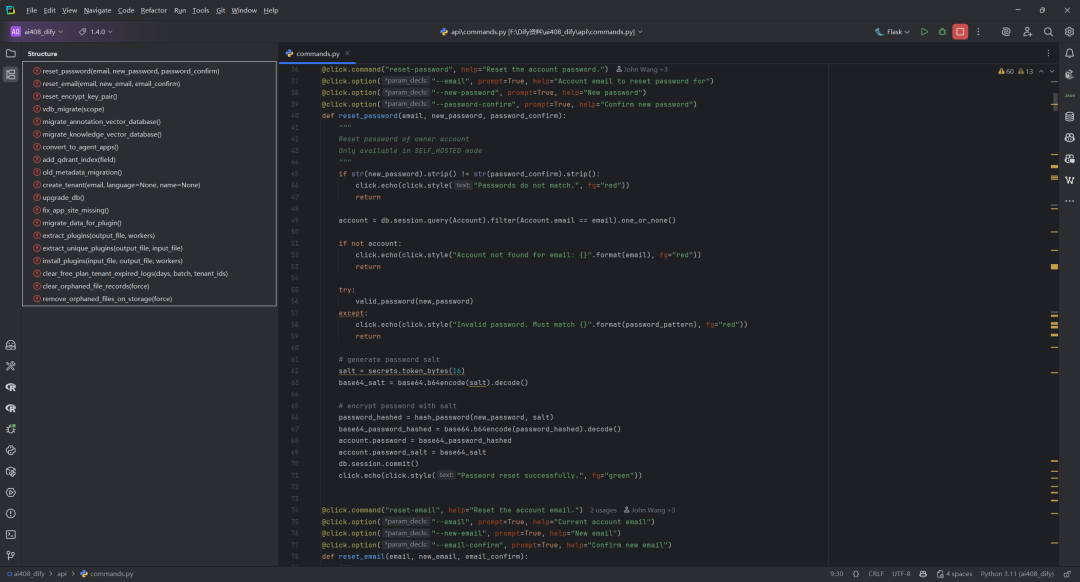
| 函数名 | 功能描述 | 参数列表 | 参数默认值 | 参数解释 |
|---|---|---|---|---|
| reset_password | 重置账户密码 | email, new_password, password_confirm | 无 | email: 账户邮箱new_password: 新密码password_confirm: 确认新密码 |
| reset_email | 重置账户邮箱 | email, new_email, email_confirm | 无 | email: 当前邮箱new_email: 新邮箱email_confirm: 确认新邮箱 |
| reset_encrypt_key_pair | 重置工作区加密密钥对 | 无 | 无 | 无 |
| vdb_migrate | 迁移向量数据库 | scope | “all” | scope: 迁移范围(knowledge/annotation/all) |
| migrate_annotation_vector_database | 迁移注释数据到目标向量数据库 | 无 | 无 | 无 |
| migrate_knowledge_vector_database | 迁移知识库向量数据库数据 | 无 | 无 | 无 |
| convert_to_agent_apps | 转换Agent Assistant为Agent App | 无 | 无 | 无 |
| add_qdrant_index | 添加Qdrant索引 | field | “metadata.doc_id” | field: 索引字段 |
| old_metadata_migration | 旧元数据迁移 | 无 | 无 | 无 |
| create_tenant | 创建租户账户 | email, language, name | language: Nonename: None | email: 邮箱language: 语言name: 工作区名 |
| upgrade_db | 升级数据库 | 无 | 无 | 无 |
| fix_app_site_missing | 修复应用相关站点缺失问题 | 无 | 无 | 无 |
| migrate_data_for_plugin | 插件数据迁移 | 无 | 无 | 无 |
| extract_plugins | 提取插件 | output_file, workers | output_file: “plugins.jsonl”workers: 10 | output_file: 输出文件workers: 并发数 |
| extract_unique_plugins | 提取唯一插件标识符 | output_file, input_file | output_file: “unique_identifiers.json”input_file: “plugins.jsonl” | output_file: 输出文件input_file: 输入文件 |
| install_plugins | 安装插件 | input_file, output_file, workers | input_file: “plugins.jsonl”output_file: “installed_plugins.jsonl”workers: 100 | input_file: 输入文件output_file: 输出文件workers: 并发数 |
| clear_free_plan_tenant_expired_logs | 清理免费计划租户过期日志 | days, batch, tenant_ids | days: 30batch: 100 | days: 天数batch: 批量大小tenant_ids: 租户ID列表 |
| clear_orphaned_file_records | 清理数据库中孤立文件记录 | force | False | force: 跳过确认强制执行 |
| remove_orphaned_files_on_storage | 清理存储中孤立文件 | force | False | force: 跳过确认强制执行 |
一.reset_password()函数
完整的执行命令reset-password示例,如下所示:
flask reset-password --email your@email.com --new-password 新密码 --password-confirm 新密码
如果不加参数,会依次提示输入邮箱、新密码和确认新密码。执行后会根据逻辑重置对应账号的密码。
`@click.command("reset-password", help="Reset the account password.")
@click.option("--email", prompt=True, help="Account email to reset password for")
@click.option("--new-password", prompt=True, help="New password")
@click.option("--password-confirm", prompt=True, help="Confirm new password")
defreset_password(email, new_password, password_confirm):
"""
Reset password of owner account
Only available in SELF_HOSTED mode
"""
if str(new_password).strip() != str(password_confirm).strip():
click.echo(click.style("Passwords do not match.", fg="red"))
return
account = db.session.query(Account).filter(Account.email == email).one_or_none()
ifnot account:
click.echo(click.style("Account not found for email: {}".format(email), fg="red"))
return
try:
valid_password(new_password)
except:
click.echo(click.style("Invalid password. Must match {}".format(password_pattern), fg="red"))
return
generate password salt
salt = secrets.token_bytes(16)
base64_salt = base64.b64encode(salt).decode()
encrypt password with salt
password_hashed = hash_password(new_password, salt)
base64_password_hashed = base64.b64encode(password_hashed).decode()
account.password = base64_password_hashed
account.password_salt = base64_salt
db.session.commit()
click.echo(click.style("Password reset successfully.", fg="green"))
`
该段代码实现了一个命令行工具命令 reset-password,用于重置账户密码,具体流程如下:
1.命令定义与参数
使用 click 库定义命令 reset-password,并要求输入三个参数:
--email:要重置密码的账户邮箱,命令行会提示输入。--new-password:新密码,命令行会提示输入。--password-confirm:确认新密码,命令行会提示输入。
2.密码一致性校验
检查两次输入的新密码是否一致(去除首尾空格后比较)。如果不一致,输出红色提示”Passwords do not match.”,并终止命令。
3.账户查找
通过 SQLAlchemy 查询数据库,查找邮箱为输入值的账户。如果找不到,输出红色提示”Account not found for email: …”,并终止命令。
4.密码格式校验
调用 valid_password(new_password) 校验新密码格式(如长度、复杂度等)。如果校验失败,捕获异常,输出红色提示”Invalid password. Must match …”,并终止命令。
5.生成password salt(密码盐)
使用 secrets.token_bytes(16) 生成16字节的随机盐,并用 base64 编码为字符串,便于存储。
6.加密新密码
调用 hash_password(new_password, salt) 用盐加密新密码,得到加密后的字节串,再用 base64 编码为字符串。
7.保存到数据库
将加密后的password和password salt分别赋值给账户对象的 password 和 password_salt 字段,然后提交数据库事务。
8.成功提示
输出绿色提示”Password reset successfully.”,表示密码重置成功。
二.reset_email()函数
reset-email 命令的完整执行示例如下:
python -m flask reset-email --email old@example.com --new-email new@example.com --email-confirm new@example.com
执行后会根据输入的参数重置账户邮箱。如果新邮箱和确认邮箱不一致,或邮箱格式不正确,会有相应的错误提示。
`@click.command("reset-email", help="Reset the account email.")
@click.option("--email", prompt=True, help="Current account email")
@click.option("--new-email", prompt=True, help="New email")
@click.option("--email-confirm", prompt=True, help="Confirm new email")
defreset_email(email, new_email, email_confirm):
"""
Replace account email
:return:
"""
if str(new_email).strip() != str(email_confirm).strip():
click.echo(click.style("New emails do not match.", fg="red"))
return
account = db.session.query(Account).filter(Account.email == email).one_or_none()
ifnot account:
click.echo(click.style("Account not found for email: {}".format(email), fg="red"))
return
try:
email_validate(new_email)
except:
click.echo(click.style("Invalid email: {}".format(new_email), fg="red"))
return
account.email = new_email
db.session.commit()
click.echo(click.style("Email updated successfully.", fg="green"))
`
该命令行工具 reset-email 用于重置账户邮箱,主要流程如下:
1.命令定义与参数获取
使用 click 定义命令和参数,要求输入当前邮箱、新邮箱和确认新邮箱。
@click.command("reset-email", help="Reset the account email.") @click.option("--email", prompt=True, help="Current account email") @click.option("--new-email", prompt=True, help="New email") @click.option("--email-confirm", prompt=True, help="Confirm new email") defreset_email(email, new_email, email_confirm):
2.新邮箱一致性校验
检查两次输入的新邮箱是否一致,不一致则提示错误并终止。
if str(new_email).strip() != str(email_confirm).strip(): click.echo(click.style("New emails do not match.", fg="red")) return
3.账户查找
在数据库中查找当前邮箱对应的账户,找不到则提示错误并终止。
`account = db.session.query(Account).filter(Account.email == email).one_or_none()
ifnot account:
click.echo(click.style("Account not found for email: {}".format(email), fg="red"))
return
`
4.新邮箱格式校验
调用 email_validate 校验新邮箱格式,失败则提示错误并终止。
try: email_validate(new_email) except: click.echo(click.style("Invalid email: {}".format(new_email), fg="red")) return
5.邮箱更新并提交
更新账户邮箱,提交数据库事务,提示成功。
account.email = new_email db.session.commit() click.echo(click.style("Email updated successfully.", fg="green"))
三.reset_encrypt_key_pair()函数
使用如下命令执行重置密钥对操作:
flask reset-encrypt-key-pair
执行后会有危险操作确认提示,输入 y 并回车即可继续。此命令仅适用于自托管(SELF_HOSTED)模式。
`@click.command(
"reset-encrypt-key-pair",
help="Reset the asymmetric key pair of workspace for encrypt LLM credentials. "
"After the reset, all LLM credentials will become invalid, "
"requiring re-entry."
"Only support SELF_HOSTED mode.",
)
@click.confirmation_option(
prompt=click.style(
"Are you sure you want to reset encrypt key pair? This operation cannot be rolled back!", fg="red"
)
)
defreset_encrypt_key_pair():
"""
Reset the encrypted key pair of workspace for encrypt LLM credentials.
After the reset, all LLM credentials will become invalid, requiring re-entry.
Only support SELF_HOSTED mode.
"""
if dify_config.EDITION != "SELF_HOSTED":
click.echo(click.style("This command is only for SELF_HOSTED installations.", fg="red"))
return
tenants = db.session.query(Tenant).all()
for tenant in tenants:
ifnot tenant:
click.echo(click.style("No workspaces found. Run /install first.", fg="red"))
return
tenant.encrypt_public_key = generate_key_pair(tenant.id)
db.session.query(Provider).filter(Provider.provider_type == "custom", Provider.tenant_id == tenant.id).delete()
db.session.query(ProviderModel).filter(ProviderModel.tenant_id == tenant.id).delete()
db.session.commit()
click.echo(
click.style(
"Congratulations! The asymmetric key pair of workspace {} has been reset.".format(tenant.id),
fg="green",
)
)
`
该段代码实现了一个用于重置工作区(租户)的加密密钥对的命令行工具,适用于”自托管”模式。主要流程如下:
1.命令注册与确认
- 使用
@click.command注册命令名为reset-encrypt-key-pair。 - 使用
@click.confirmation_option增加危险操作的二次确认提示。
@click.command( "reset-encrypt-key-pair", help="Reset the asymmetric key pair of workspace for encrypt LLM credentials. " "After the reset, all LLM credentials will become invalid, " "requiring re-entry." "Only support SELF_HOSTED mode.", ) @click.confirmation_option( prompt=click.style( "Are you sure you want to reset encrypt key pair? This operation cannot be rolled back!", fg="red" ) )
2.入口函数定义
- 定义
reset_encrypt_key_pair函数,包含详细注释说明用途。
defreset_encrypt_key_pair(): """ Reset the encrypted key pair of workspace for encrypt LLM credentials. After the reset, all LLM credentials will become invalid, requiring re-entry. Only support SELF_HOSTED mode. """
3. 检查运行环境
- 判断当前系统是否为
SELF_HOSTED版本,否则直接退出。
if dify_config.EDITION != "SELF_HOSTED": click.echo(click.style("This command is only for SELF_HOSTED installations.", fg="red")) return
4. 查询所有租户
- 查询数据库中所有租户(Tenant)。
tenants = db.session.query(Tenant).all()
5. 遍历租户并重置密钥
- 遍历每个租户,若租户不存在则提示并退出。
- 为每个租户生成新的加密公钥。
- 删除该租户下所有自定义 Provider 和 ProviderModel 记录(密钥重置后原有凭据失效)。
- 提交数据库更改。
`for tenant in tenants:
ifnot tenant:
click.echo(click.style("No workspaces found. Run /install first.", fg="red"))
return
tenant.encrypt_public_key = generate_key_pair(tenant.id)
db.session.query(Provider).filter(Provider.provider_type == "custom", Provider.tenant_id == tenant.id).delete()
db.session.query(ProviderModel).filter(ProviderModel.tenant_id == tenant.id).delete()
db.session.commit()
`
6. 操作完成提示
- 每个租户重置完成后输出提示信息。
click.echo( click.style( "Congratulations! The asymmetric key pair of workspace {} has been reset.".format(tenant.id), fg="green", ) )
总结:该命令用于重置所有租户的加密密钥对,并清除相关凭据,确保密钥重置后所有 LLM 凭据都需重新录入,仅限自托管环境使用。
四.vdb_migrate()函数
在命令行中执行 vdb-migrate 命令的完整示例:
python api/commands.py vdb-migrate --scope=all
也可以指定 scope 参数为 knowledge 或 annotation,例如:
python api/commands.py vdb-migrate --scope=knowledge
或
python api/commands.py vdb-migrate --scope=annotation
该命令会根据 scope 参数迁移对应的向量数据库。
@click.command("vdb-migrate", help="Migrate vector db.") @click.option("--scope", default="all", prompt=False, help="The scope of vector database to migrate, Default is All.") defvdb_migrate(scope: str): if scope in {"knowledge", "all"}: migrate_knowledge_vector_database() if scope in {"annotation", "all"}: migrate_annotation_vector_database()
该段代码定义了一个名为 vdb_migrate 的 Click 命令,用于迁移向量数据库。
1.命令定义与参数说明
- 使用
@click.command装饰器定义命令名为vdb-migrate,帮助信息为”Migrate vector db.” - 使用
@click.option定义命令行参数--scope,默认值为all,不需要交互式输入,帮助信息为”迁移向量数据库的范围,默认是全部”。
@click.command("vdb-migrate", help="Migrate vector db.") @click.option("--scope", default="all", prompt=False, help="The scope of vector database to migrate, Default is All.")
2.命令实现
- 定义函数
vdb_migrate(scope: str),接收scope参数。 - 判断
scope是否为"knowledge"或"all",如果是,则调用migrate_knowledge_vector_database()进行知识库向量数据库迁移。 - 判断
scope是否为"annotation"或"all",如果是,则调用migrate_annotation_vector_database()进行标注向量数据库迁移。
defvdb_migrate(scope: str): if scope in {"knowledge", "all"}: migrate_knowledge_vector_database() if scope in {"annotation", "all"}: migrate_annotation_vector_database()
3.代码流程总结
- 用户在命令行输入
vdb-migrate命令时,可以通过--scope参数指定迁移范围(knowledge、annotation或all)。 - 根据参数,分别调用知识库或标注数据的向量数据库迁移函数。
- 这两个迁移函数分别负责不同类型数据的向量数据库迁移,具体实现见
migrate_knowledge_vector_database和migrate_annotation_vector_database。
参考文献
[0] commands.py中的函数解析1:reset_password等:https://z0yrmerhgi8.feishu.cn/wiki/R35Pwv1fliyP9rkCMYgcjRZknve
[1] click github:https://github.com/pallets/click
[2] click官方文档:https://click.palletsprojects.com/en/stable/
[3] click-extra github:https://github.com/kdeldycke/click-extra
[4] click-extra官方文档:https://kdeldycke.github.io/click-extra/
知识星球服务内容:Dify源码剖析及答疑,Dify对话系统源码,NLP电子书籍报告下载,公众号所有付费资料。加微信buxingtianxia21进NLP工程化资料群。
(文:NLP工程化)
相关文章