基于大型语言模型与图逻辑的Python爬虫库
 ScrapeGraphAI: 只需抓取一次
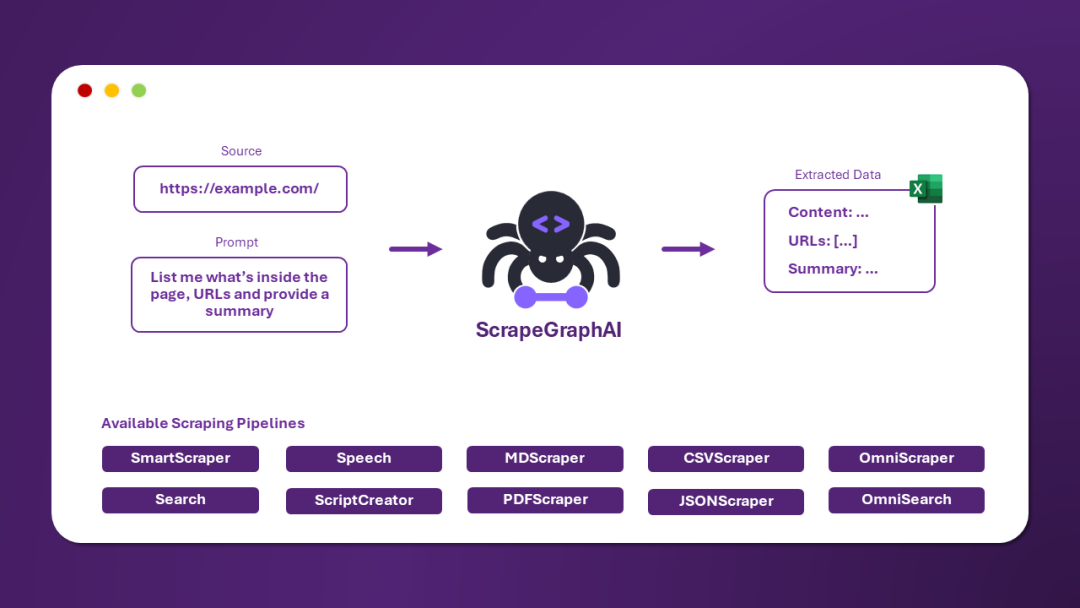
ScrapeGraphAI 是一个网络爬虫 Python 库,使用大型语言模型和直接图逻辑为网站和本地文档(XML,HTML,JSON 等)创建爬取管道。
只需告诉库您想提取哪些信息,它将为您完成!
 快速安装
快速安装
Scrapegraph-ai 的参考页面可以在 PyPI 的官方网站上找到: pypi。
ounter(line pip install scrapegraphai
注意: 建议在虚拟环境中安装该库,以避免与其他库发生冲突 
 用法
用法
有三种主要的爬取管道可用于从网站(或本地文件)提取信息:
SmartScraperGraph: 单页爬虫,只需用户提示和输入源;SearchGraph: 多页爬虫,从搜索引擎的前 n 个搜索结果中提取信息;SpeechGraph: 单页爬虫,从网站提取信息并生成音频文件。SmartScraperMultiGraph: 多页爬虫,给定一个提示 可以通过 API 使用不同的 LLM,如 OpenAI,Groq,Azure 和 Gemini,或者使用 Ollama 的本地模型。
案例 1: 使用本地模型的 SmartScraper
请确保已安装 Ollama 并使用 ollama pull 命令下载模型。
ounter(lineounter(lineounter(lineounter(lineounter(lineounter(lineounter(lineounter(lineounter(lineounter(lineounter(lineounter(lineounter(lineounter(lineounter(lineounter(lineounter(lineounter(lineounter(lineounter(lineounter(lineounter(lineounter(lineounter(lineounter(line from scrapegraphai.graphs import SmartScraperGraph graph_config = { "llm": { "model": "ollama/mistral", "temperature": 0, "format": "json", # Ollama 需要显式指定格式 "base_url": "http://localhost:11434", # 设置 Ollama URL }, "embeddings": { "model": "ollama/nomic-embed-text", "base_url": "http://localhost:11434", # 设置 Ollama URL }, "verbose": True, } smart_scraper_graph = SmartScraperGraph( prompt="List me all the projects with their descriptions", # 也接受已下载的 HTML 代码的字符串 source="https://perinim.github.io/projects", config=graph_config ) result = smart_scraper_graph.run() print(result)
输出将是一个包含项目及其描述的列表,如下所示:
ounter(line {'projects': [{'title': 'Rotary Pendulum RL', 'description': 'Open Source project aimed at controlling a real life rotary pendulum using RL algorithms'}, {'title': 'DQN Implementation from scratch', 'description': 'Developed a Deep Q-Network algorithm to train a simple and double pendulum'}, ...]}
案例 2: 使用混合模型的 SearchGraph
我们使用 Groq 作为 LLM,使用 Ollama 作为嵌入模型。
ounter(lineounter(lineounter(lineounter(lineounter(lineounter(lineounter(lineounter(lineounter(lineounter(lineounter(lineounter(lineounter(lineounter(lineounter(lineounter(lineounter(lineounter(lineounter(lineounter(lineounter(lineounter(lineounter(lineounter(lineounter(line from scrapegraphai.graphs import SearchGraph # 定义图的配置 graph_config = { "llm": { "model": "groq/gemma-7b-it", "api_key": "GROQ_API_KEY", "temperature": 0 }, "embeddings": { "model": "ollama/nomic-embed-text", "base_url": "http://localhost:11434", # 任意设置 Ollama URL }, "max_results": 5, } # 创建 SearchGraph 实例 search_graph = SearchGraph( prompt="List me all the traditional recipes from Chioggia", config=graph_config ) # 运行图 result = search_graph.run() print(result)
输出将是一个食谱列表,如下所示:
ounter(line {'recipes': [{'name': 'Sarde in Saòre'}, {'name': 'Bigoli in salsa'}, {'name': 'Seppie in umido'}, {'name': 'Moleche frite'}, {'name': 'Risotto alla pescatora'}, {'name': 'Broeto'}, {'name': 'Bibarasse in Cassopipa'}, {'name': 'Risi e bisi'}, {'name': 'Smegiassa Ciosota'}]}
案例 3: 使用 OpenAI 的 SpeechGraph
您只需传递 OpenAI API 密钥和模型名称。
ounter(lineounter(lineounter(lineounter(lineounter(lineounter(lineounter(lineounter(lineounter(lineounter(lineounter(lineounter(lineounter(lineounter(lineounter(lineounter(lineounter(lineounter(lineounter(lineounter(lineounter(lineounter(lineounter(lineounter(lineounter(lineounter(lineounter(line from scrapegraphai.graphs import SpeechGraph graph_config = { "llm": { "api_key": "OPENAI_API_KEY", "model": "openai/gpt-3.5-turbo", }, "tts_model": { "api_key": "OPENAI_API_KEY", "model": "tts-1", "voice": "alloy" }, "output_path": "audio_summary.mp3", } # ************************************************ # 创建 SpeechGraph 实例并运行 # ************************************************ speech_graph = SpeechGraph( prompt="Make a detailed audio summary of the projects.", source="https://perinim.github.io/projects/", config=graph_config, ) result = speech_graph.run() print(result)
输出将是一个包含页面上项目摘要的音频文件。
项目地址
https://github.com/ScrapeGraphAI/Scrapegraph-ai/blob/main/docs/chinese.md
扫码加入技术交流群,备注「开发语言-城市-昵称」
(文:GitHubStore)
相关文章