Dify中的sandbox服务
本文使用Dify v1.5.0版本,主要介绍了Dify中的sandbox服务,包括本地sandbox源码运行,以及相关配置文件的介绍。
一.sandbox服务
该部分配置定义了 DifySandbox 服务,用于代码执行的安全沙箱环境。
`` # The DifySandbox
sandbox:
image: langgenius/dify-sandbox:0.2.12
restart: always
environment:
The DifySandbox configurations
Make sure you are changing this key for your deployment with a strong key.
You can generate a strong key using openssl rand -base64 42.
API_KEY: ${SANDBOX_API_KEY:-dify-sandbox}
GIN_MODE: ${SANDBOX_GIN_MODE:-release}
WORKER_TIMEOUT: ${SANDBOX_WORKER_TIMEOUT:-15}
ENABLE_NETWORK: ${SANDBOX_ENABLE_NETWORK:-true}
HTTP_PROXY: ${SANDBOX_HTTP_PROXY:-http://ssrf_proxy:3128}
HTTPS_PROXY: ${SANDBOX_HTTPS_PROXY:-http://ssrf_proxy:3128}
SANDBOX_PORT: ${SANDBOX_PORT:-8194}
PIP_MIRROR_URL: ${PIP_MIRROR_URL:-}
volumes:
- ./volumes/sandbox/dependencies:/dependencies
- ./volumes/sandbox/conf:/conf
healthcheck:
test: [ 'CMD', 'curl', '-f', 'http://localhost:8194/health' ]
networks:
- ssrf_proxy_network
``
1.镜像与重启策略
- 使用
langgenius/dify-sandbox:0.2.12镜像 - 配置为
always自动重启
2.环境变量设置
API_KEY: 安全密钥(建议使用强密钥)GIN_MODE: 运行模式(release 模式)WORKER_TIMEOUT: 工作超时时间(15秒)ENABLE_NETWORK: 允许网络访问HTTP_PROXY/HTTPS_PROXY: 代理设置SANDBOX_PORT: 服务端口(8194)PIP_MIRROR_URL: Python 包镜像地址
3.卷挂载
- 依赖文件目录:
./volumes/sandbox/dependencies:/dependencies - 配置文件目录:
./volumes/sandbox/conf:/conf
4.健康检查
通过 curl 请求 /health 端点。
5.网络配置
连接到 ssrf_proxy_network(内部安全网络)。
二.sandbox环境变量
文件位置:dify\docker\.env
`# ------------------------------
Environment Variables for sandbox Service
------------------------------
The API key for the sandbox service
SANDBOX_API_KEY=dify-sandbox
The mode in which the Gin framework runs
SANDBOX_GIN_MODE=release
The timeout for the worker in seconds
SANDBOX_WORKER_TIMEOUT=15
Enable network for the sandbox service
SANDBOX_ENABLE_NETWORK=true
HTTP proxy URL for SSRF protection
SANDBOX_HTTP_PROXY=http://ssrf_proxy:3128
HTTPS proxy URL for SSRF protection
SANDBOX_HTTPS_PROXY=http://ssrf_proxy:3128
The port on which the sandbox service runs
SANDBOX_PORT=8194
`
| 环境变量配置 | 解释 |
|---|---|
| SANDBOX_API_KEY | 沙箱服务的API密钥,用于身份验证 |
| SANDBOX_GIN_MODE | Gin框架的运行模式,设为”release”表示生产环境模式 |
| SANDBOX_WORKER_TIMEOUT | 工作进程超时时间(15秒) |
| SANDBOX_ENABLE_NETWORK | 是否允许沙箱访问网络(设为true) |
| SANDBOX_HTTP_PROXY 和SANDBOX_HTTPS_PROXY | 用于SSRF保护的HTTP和HTTPS代理 |
| SANDBOX_PORT | 沙箱服务运行的端口号 |
三.sandbox源码运行(准备)
1.修改配置文件
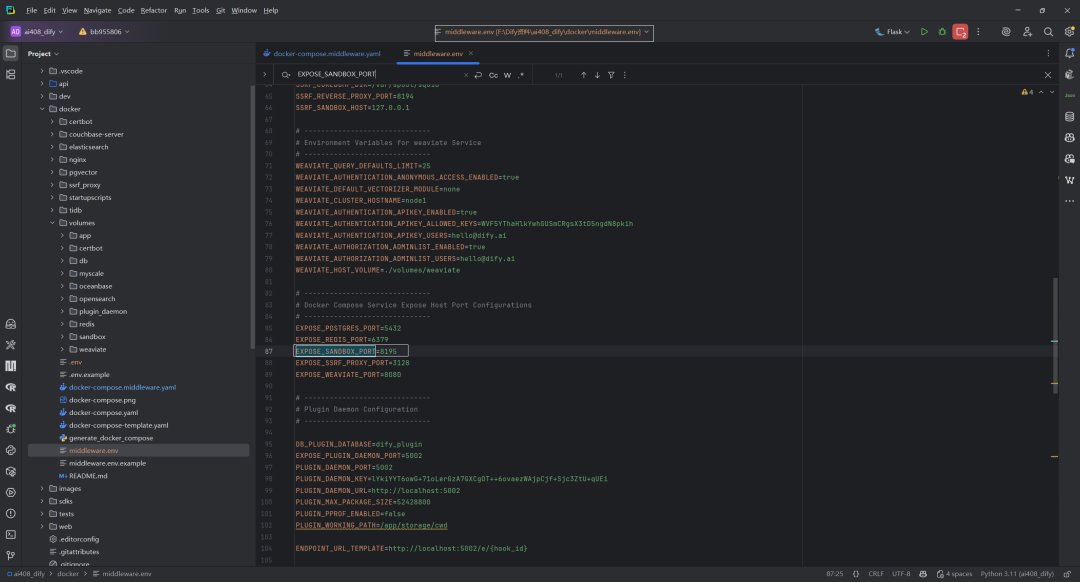
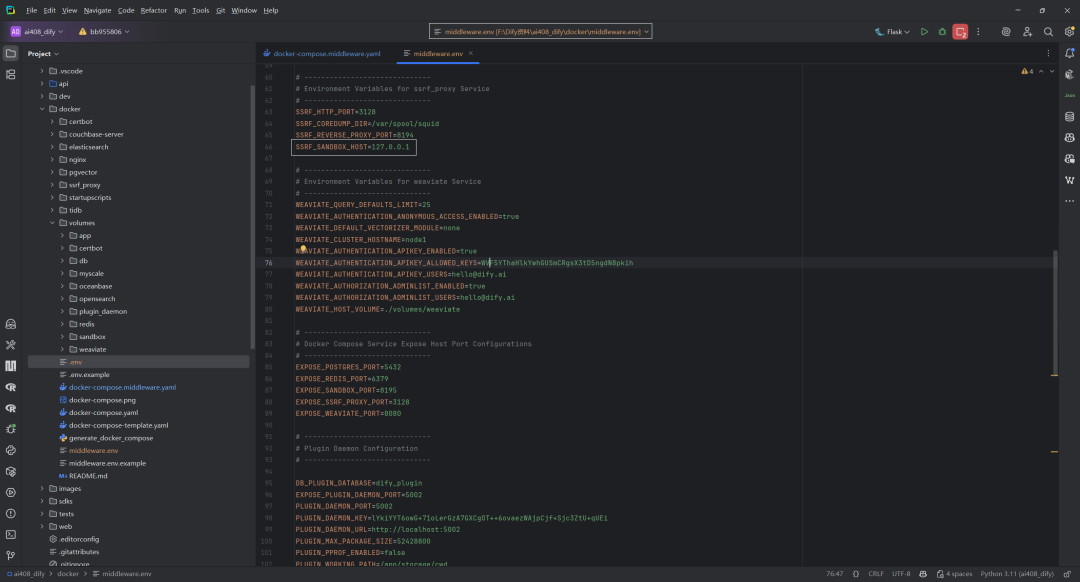
文件位置:dify\docker\middleware.env
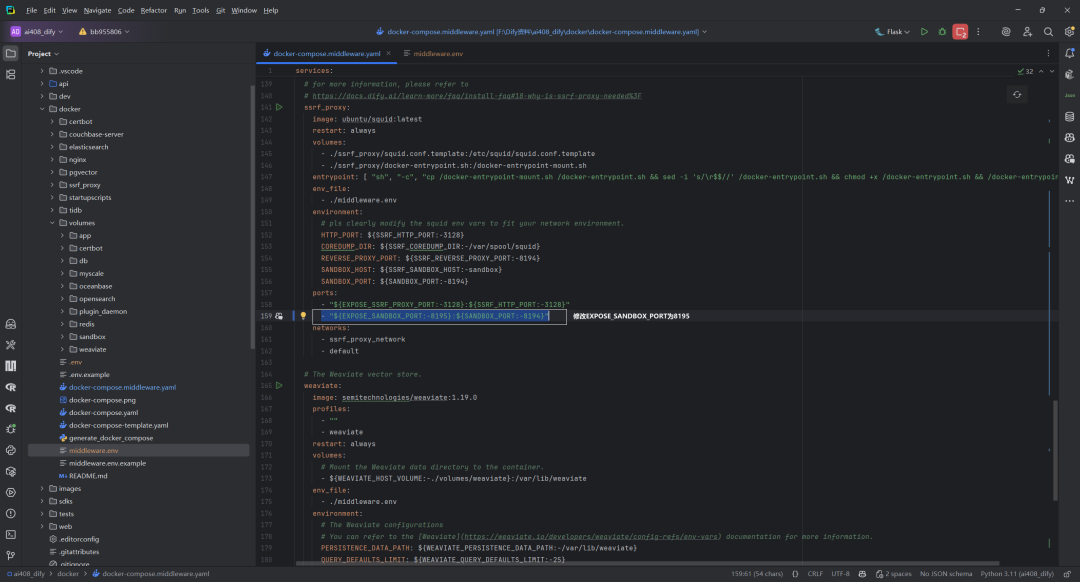
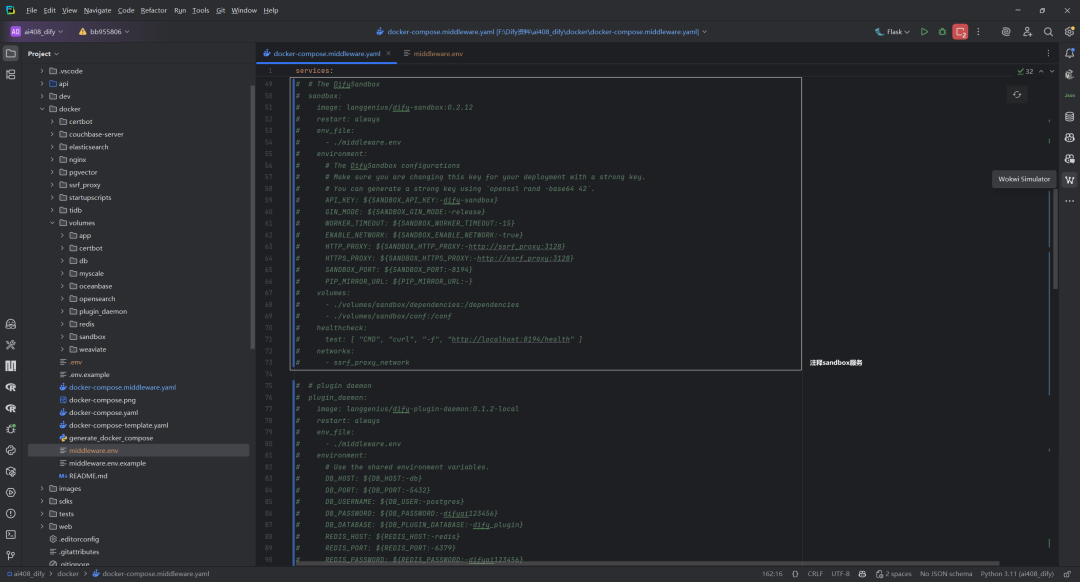
文件位置:dify\docker\docker-compose.middleware.yaml
(1)EXPOSE_SANDBOX_PORT=8195
(2)SSRF_SANDBOX_HOST=127.0.0.1
(3)”EXPOSE_SANDBOX_PORT:−8195:{SANDBOX_PORT:-8194}”
2.注释sandbox服务
四.sandbox源码运行
1.操作命令
理想情况下,拉代码、安装依赖库、编译和运行,如下所示:
git clone https://github.com/langgenius/dify-sandbox ./install.sh /build/build_[amd64|arm64].sh ./main
2.config.yaml配置文件
`app:
port:8194
debug:True
key:dify-sandbox
max_workers:4
max_requests:50
worker_timeout:5
python_path:/home/duomiagi/miniconda3/bin/python
python_lib_path:
-"/home/duomiagi/miniconda3/lib/python3.10"
-"/home/duomiagi/miniconda3/lib/python3.10/site-packages"
-"/home/duomiagi/miniconda3/lib/python3.10/lib-dynload"
-"/usr/lib/x86_64-linux-gnu"
-"/etc/ssl/certs/ca-certificates.crt"
-"/etc/nsswitch.conf"
-"/etc/hosts"
-"/etc/resolv.conf"
- "/run/systemd/resolve/stub-resolv.conf" # Permission denied
- "/run/resolvconf/resolv.conf" # not such file
-"/etc/localtime"
-"/usr/share/zoneinfo"
-"/etc/timezone"
python_pip_mirror_url:https://pypi.tuna.tsinghua.edu.cn/simple
enable_network:True# please make sure there is no network risk in your environment
enable_preload:False# please keep it as False for security purposes
allowed_syscalls:# please leave it empty if you have no idea how seccomp works
proxy:
socks5:''
http:''
https:''
`
python_lib_path部分解释,如下所示:
(1)Python 库路径(行 10-12)- 当前启用的 Python 标准库位置
(2)/usr/lib/x86_64-linux-gnu – Linux 系统上 64 位共享库的标准位置
(3)网络和安全相关文件
(4)时区相关文件
3.权限问题
但是,使用WSL2环境(Windows11+Ubuntu22.04)可能会遇到一些权限问题。解决方案如下所示:
`sudo mkdir -p /var/sandbox/sandbox-python && sudo cp internal/core/runner/python/python.so /var/sandbox/sandbox-python/
sudo mkdir -p /var/sandbox/sandbox-nodejs && sudo cp internal/core/runner/nodejs/nodejs.so /var/sandbox/sandbox-nodejs/
sudo chmod -R 777 /var/sandbox/sandbox-python
sudo chmod -R 777 /var/sandbox/sandbox-nodejs
sudo chmod -R 777 /usr/lib/x86_64-linux-gnu /etc/ssl/certs/ca-certificates.crt /etc/nsswitch.conf /etc/hosts /etc/resolv.conf /etc/localtime /usr/share/zoneinfo /etc/timezone
`
特别说明:以上sudo chmod -R 777方式仅供本地调试学习使用。
(1)”/run/systemd/resolve/stub-resolv.conf”
由于sudo chmod -R 777后,GoLand调试还是没有权限,因此注释(暂不清楚是否有后遗症)。
(2)”/run/resolvconf/resolv.conf”
由于没有这个文件,因此注释。
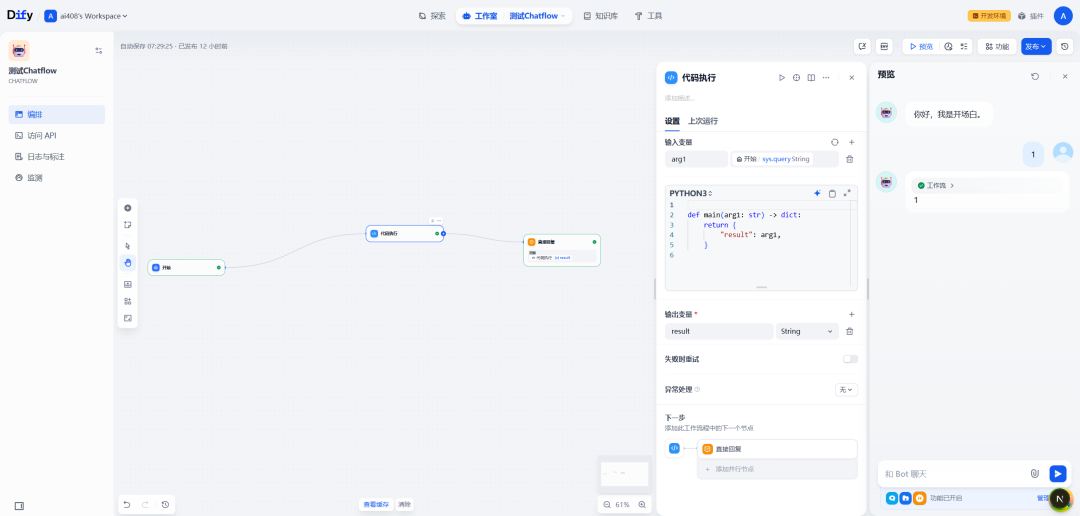
4.代码节点测试
本地sandbox源码运行,如下所示:
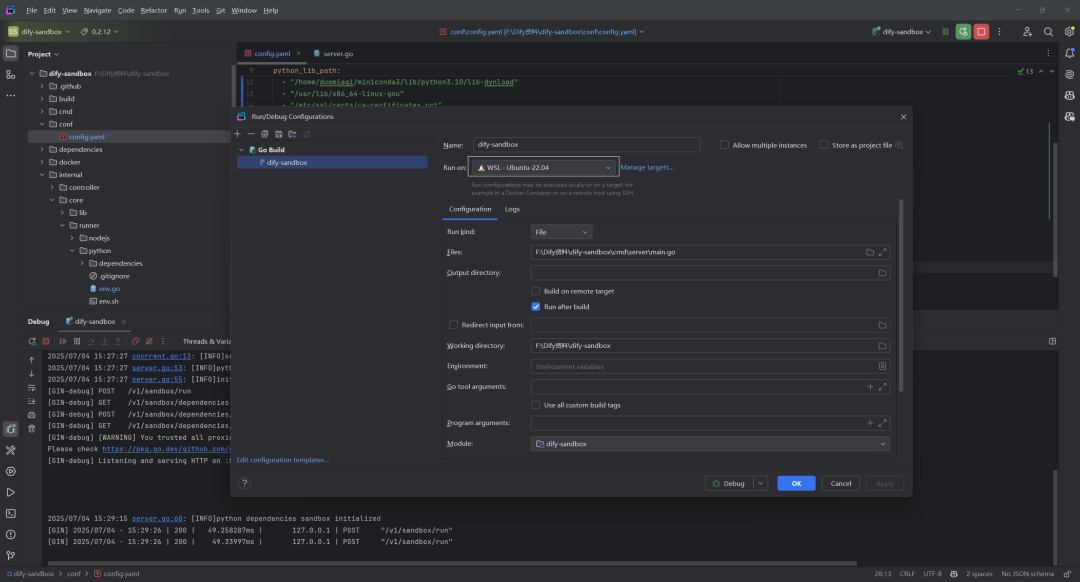
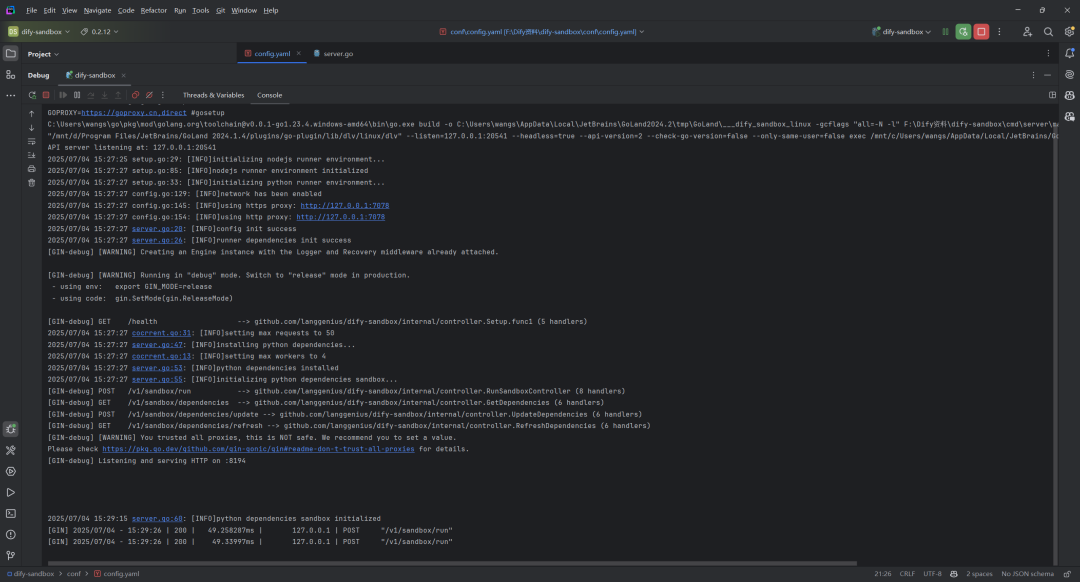
新建一个极简的Chatflow示例,测试代码节点,如下所示:
5.config.yaml.example(sandbox)
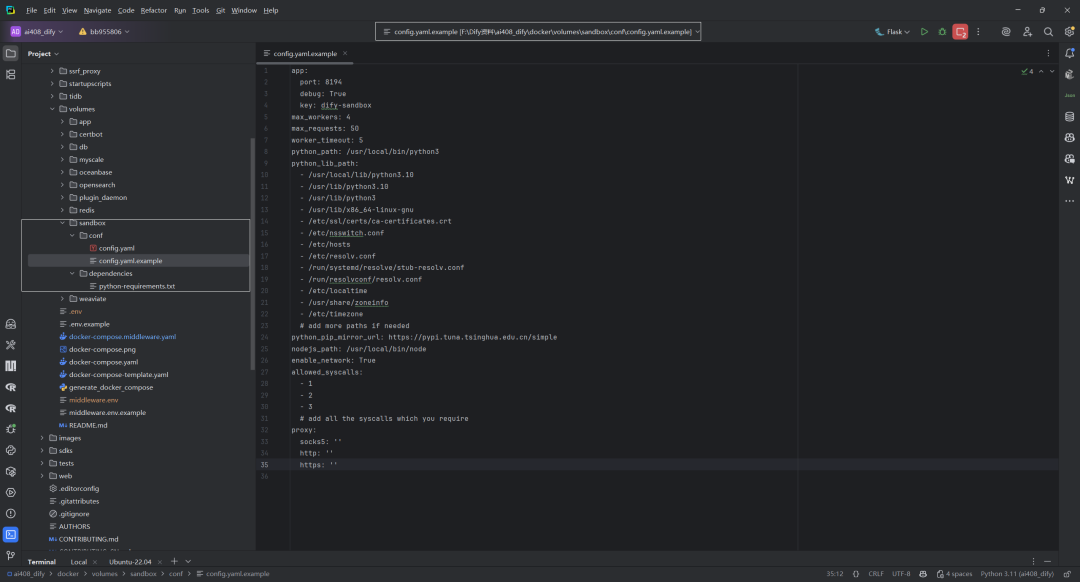
文件位置:dify\docker\volumes\sandbox\conf\config.yaml.example
这是一个沙盒环境的配置文件,用于定义应用程序的运行参数和限制。该配置文件主要用于设置一个受控的沙盒环境,确保应用程序在安全的环境中运行,同时提供必要的资源访问权限。
(1)应用程序基本配置
app.port: 8194– 应用程序监听的端口号app.debug: True– 是否启用调试模式app.key: dify-sandbox– 应用程序的密钥标识
(2)资源和性能限制
max_workers: 4– 最大工作线程数量max_requests: 50– 最大请求数量worker_timeout: 5– 工作线程超时时间(单位:秒)
(3)Python环境配置
python_path– Python解释器的路径python_lib_path– Python库和系统文件的路径列表,包括:- Python库目录
- SSL证书
- 系统配置文件
- 时区信息等
python_pip_mirror_url– 使用清华大学的PyPI镜像源
(4)Node.js配置
nodejs_path: /usr/local/bin/node– Node.js解释器的路径
(5)安全和网络设置
enable_network: True– 是否启用网络功能allowed_syscalls– 允许的系统调用ID列表proxy– 代理服务器设置(当前均为空)- SOCKS5代理
- HTTP代理
- HTTPS代理
参考文献
[0] Dify中的sandbox服务:https://z0yrmerhgi8.feishu.cn/wiki/BqrtwiAYuiMlZMkNN4ocW8xYnKb
[1] langgenius/dify-sandbox:https://github.com/langgenius/dify-sandbox
[2] DifySandbox:https://docs.dify.ai/zh-hans/development/backend/sandbox/README
[3] dify-sandbox/FAQ.md:https://github.com/langgenius/dify-sandbox/blob/main/FAQ.md
[4] DifySandbox贡献:https://docs.dify.ai/zh-hans/development/backend/sandbox/contribution
[5] dify-sandbox-py:https://github.com/svcvit/dify-sandbox-py
知识星球:Dify源码剖析及答疑,Dify扩展系统源码,AI书籍课程|AI报告论文,公众号付费资料。加微信buxingtianxia21进NLP工程化资料群,以及Dify交流群。
(文:NLP工程化)
Dify中的sandbox服务最先出现在每时AI。
相关文章